






Ather Scooty has become the first choice of many people these days because it is eco-friendly, comes with smart features, and also feels very smooth to drive. But just like every electric vehicle has its own issues, Ather users also face minor problems at times. Like battery draining quickly, problems with charging, mobile app not syncing properly, or glitches after a software update. The solution to all these things is not difficult; with a little attention and regular service, you can easily avoid these problems. In this post, we will explain the Ather scooty common problems in a simple way and will also tell you their easy fixes, so that your daily ride is without any tension.
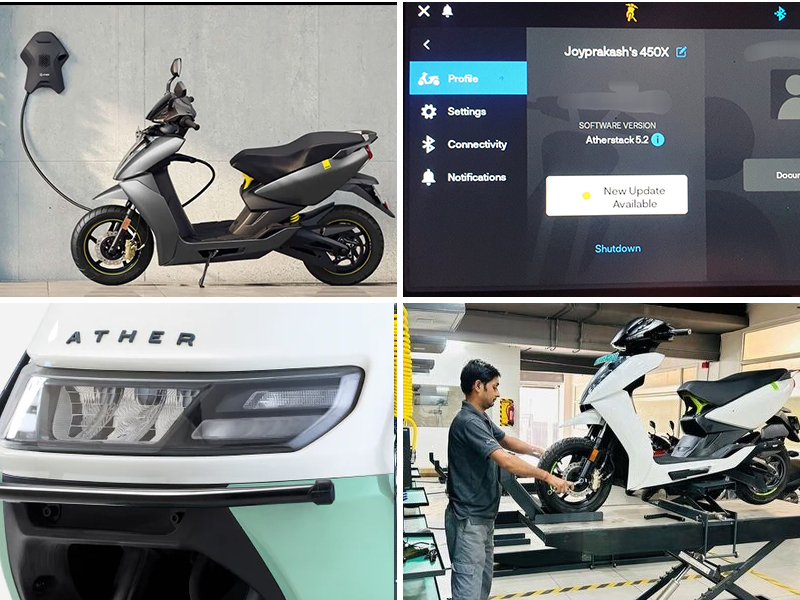
1. Charging Issues in Ather Scooty and Quick Fixes
Problem 1: Scooty does not start charging
Solution: First of all, check whether the charger and socket are connected properly or not. Sometimes charging does not start due to a loose connection or the power supply being cut off.
Problem 2: No light or indication comes after plugging the charger
Solution: The Charger’s wire, pin, or port may be damaged. Attempt to use the charger on a different scooter or attach a different charger to your own. Replacement of the charger will be necessary if the problem continues.
Problem 3: Charging is very slow
Solution: Sometimes charging is slow due to an excess load in the public charging station. Also, check whether the full current is coming into the socket of the house or not. If this is happening repeatedly, then the battery or charging port should be checked at the service center.
Problem 4: Charging happens intermittently or stops in between
Solution: This issue mostly happens due to a software glitch or a heating problem. Also, restart the Scooty, and check in the app if any error message has come. If the problem repeats, then visit the service center.
Bonus Tip: Always charge in a dry & dust-free place. A wet socket or excessive heat also affects charging. This is one of the Ather scooty common problems users face.
2. Battery Drain Problems and How to Prevent Them
Problem 1: Battery drains quickly
Solution: If you take too many short rides or start/stop frequently, the battery drains quickly. Plan your rides a little and avoid unnecessary stops.
Problem 2: Keeping the scooter idle for a long time
Solution: If you leave the scooter for a long time, the battery automatically discharges. Ride the scooter at least once a week so that the battery remains active.
Problem 3: Load of extra accessories
Solution: Extra lights, phone chargers, or gadgets increase the load on the battery. Use them only when necessary.
Problem 4: Software running in the background
Solution: Turn off unnecessary features in the app and keep the software updated.
Prevention Tips: Always charge the battery to the recommended level. Battery drain is also listed in the Ather scooty common problems.
3. Common Software Glitches and Reset Solutions
Problem 1: Touchscreen hangs or responds slowly
Solution: Restart the Scooty after turning off the power entirely. Install the most recent software update if the problem keeps happening.
Problem 2: Navigation or maps not loading
Solution: Check Internet connection and other app sync. If there is a sync issue, log out of the app and log in again.
Problem 3: The Ride stats or battery percentage are showing incorrectly.
Solution: Use the Dashboard reset option. If the reading is still incorrect, you will have to get the software calibration done at the service center.
Problem 4: Error codes without actual problem
Solution: This is mostly a temporary glitch. Do a soft reset (press the power button for 10 seconds) so that the system gets refreshed.
Reset Tips:
- Make it a habit to update the software of the scooter every 2-3 months.
- The version of both the app and the scooter should match.
- If a hard reset is required, it is best to take the help of a manual guide or a service center.
Many of these software glitches are part of the Ather scooty common problems.
Also read: 9 Iconic Bikes of The Decade (1990-2000)
4. Display and Connectivity Issues in Ather Scooters
Problem 1: Nothing is visible on the display, or the screen goes blank
Solution: Switch off the Scooty’s main power source and restart it. The wiring or display unit will need to be examined at the service center if the screen still won’t turn on.
Problem 2: Touchscreen responding slowly
Solution: Keep your finger dry and clean; there should be no dust or moisture on the screen. If the problem continues, update the software or try to reset the dashboard.
Problem 3: Bluetooth is not connecting
Solution: Turn off the Bluetooth of the mobile and turn it on again, then remove the pairing in the Ather app and connect again. Sometimes restarting the phone also works.
Problem 4: Scooty data is not getting updated in the app
Solution: Keep the internet connection stable, and let the app run in the background. If the data is not syncing, try logging out of the app and logging in.
Prevention Tips:
- Keep the display clean before every ride and avoid moisture.
- Check the connectivity settings after every update.
- When the battery is low, both the display and Bluetooth can become slow, so keep the battery charged properly.
Display and connectivity issues also fall under Ather Scooty common problems.
5. Maintenance and Service Tips to Avoid Frequent Problems
- Follow Regular Charging Routine: Always charge the battery to the recommended level. Overcharging or completely draining reduces the battery life.
- Update the software on time: Ather regularly releases software updates that fix bugs and improve features. Install every update immediately.
- Use a Clean and Dry Parking Space: Always park the scooter in a dry place. Avoiding dust, moisture, and direct sunlight increases the life of both the battery and display.
- Do not miss the service schedule: Follow other recommended service intervals. In every service, battery health, brakes, tyres, and wiring are checked, which prevents future problems.
- Avoid the extra load of accessories: Extra lights, a phone charger, or any additional gadgets put a load on the battery. Keep their use limited.
- Improve Riding Habits: Sudden acceleration and harsh braking put stress on both the battery and the motor. Maintain smooth riding habits.
Conclusion:
Ather Scooty is a modern, eco-friendly electric scooter, but just like every vehicle has its own issues; Ather Scooty users also face common problems at some point. Charging issues, battery drain, software glitches, or display and connectivity problems – these are all normal. A little attention and regular maintenance are enough to avoid these Ather Scooty common problems. Follow regular charging routine, apply timely software updates, use a clean-dry parking space, and maintain smooth riding habits. Avoiding the extra load of accessories and not missing service schedules also increases the life of the battery and motor. If a problem arises, do basic checks first and seek help from the service center if needed. With a little smart usage and maintenance, Ather Scooty will give you a hassle-free, smooth, and enjoyable ride that will last for the long term.
FAQ’s
- Why is Ather failing?
Ather is not failing; it is just running a little slow. The price is high, charging stations are less & service centers are not available everywhere, so sometimes people buy other brands.
- What are the disadvantages of Ather 450X?
Ather 450X is great, but a little expensive. The range is a little less for long rides, and a service center or charging point is not easily available in every city.
- Has any Ather caught fire?
Till now, there has been no official case of an Ather scooter catching fire. The company makes the battery safe and installs a system to prevent overheating.
- Is an Ather battery repairable?
You cannot repair the battery of Ather yourself. You must take it to the service center if it sustains damage. If it is covered by warranty, there is no charge for repairs or replacements.
- Is Ather rainproof?
Yes, Ather works in normal rain; it does not get damaged by water. Just do not take it into deep water, otherwise it can cause problems.
Related Blog:


